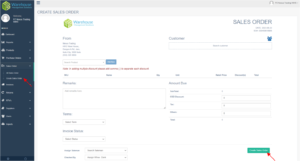
Click “Sales Orders” from your dashboard sidebar and choose “Create Sales Order” from the dropdown. You will then be redirected to the Create Sales Order page.
Fill in new Sales Order information below such as:
Customer - click the customer box to search for existing customer
Product – search for existing product and click “add item”
Remarks – if there are
Terms – select terms on the dropdown menu
Invoice Status - select terms on the dropdown menu
Assign Salesman - select salesman on the dropdown menu
Checked By - select approver on the dropdown menu
Amount due – it will auto-generate once you add an item, you will see the total amount of the PO